


Table of Contents
Your law firm's website might look stunning, but poor technical SEO for lawyers could be sabotaging your rankings. While most firms focus on content, law firm technical SEO is the foundation of online success. Poor load experience can reduce trust and keep potential clients from contacting the firm, especially on mobile.
Despite this clear danger, many firms consistently overlook legal website optimization due to perceived complexity or lack of technical expertise. As a result, prospects may choose competitors, and law firms may miss potential consultations and cases.
Wondering what your site is missing? Let's walk you through some SEO best practices to help your firm climb Google rankings and convert more visitors into clients.
What Is Technical SEO?
Technical SEO refers to the optimization of your website's infrastructure to make it easier for Google to crawl, index, and rank your pages well. This aspect of search engine optimization deals with behind-the-scenes elements like site speed, mobile-friendliness, site architecture, and security—factors that help search engines crawl, render, and evaluate your pages.
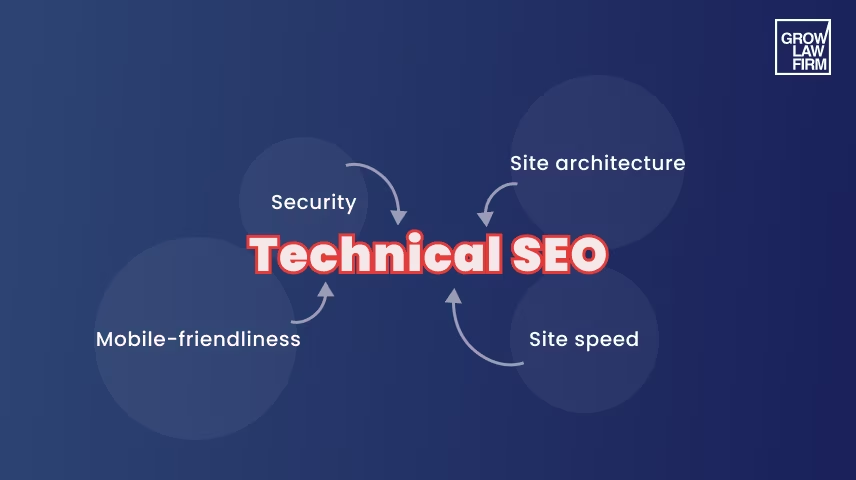
Even the most compelling legal content won't rank without a strong technical foundation. Technical issues like slow loading times, broken links, or poor mobile responsiveness signal to search engines that your site may not provide the best experience for people seeking legal services.
Why Is Technical SEO Important for Lawyers?
Well, it directly impacts both the visibility and credibility of your law firm to Google and, in turn, prospects. If the technical aspect of your website is lacking, it can hurt search visibility and reduce conversion rates.
Because users tend to focus on the most visible results, technical issues can become a competitive disadvantage.
Today's clients associate website performance with professional competence. They instinctively trust secure, error-free legal websites over those with technical problems, creating an immediate credibility advantage for technically optimized firms.
Implementing proper attorney SEO can support page speed, user experience, conversion tracking, and long-term practice growth.
Discover how to win the most valuable local visibility with our map pack optimization guide.
Key Technical SEO Factors for Law Firm Websites
Technical SEO for lawyers directly impacts rankings, traffic, and user experience. Optimizing technical elements ensures your site is visible, functional, and appealing to both search engines and potential clients.
1. Crawling
Crawling is the process where search engines send bots to discover and examine the content on your law firm's website. This critical first step determines whether Google can even find your practice areas, attorney profiles, and legal resources. For law firms, proper crawling ensures that your expertise reaches potential clients when they need legal assistance.
Common crawling errors include 404 pages, DNS issues, blocked resources, and mobile rendering problems that keep Google from properly evaluating important content. These issues are important SEO ranking factors and can significantly impact your visibility and prevent your pages from appearing in search results.
Action Tips on How to Fix Crawl Errors
Here are practical solutions to ensure search engines properly crawl your legal website:
- Redirect moved pages to their relevant replacements with 301 redirects; retain a 404 or 410 response when content is permanently removed without a suitable replacement.
- Check Google Search Console regularly to identify crawl errors, rejected URLs, and coverage issues that might be preventing your legal content from being discovered.
- Reduce unnecessary filter URLs and link to canonical versions. Protect staging sites with authentication, and allow Googlebot to read noindex directives on publicly accessible pages.
- Ensure robots.txt file isn't blocking important pages like your contact information, attorney credentials, or case results that demonstrate your expertise.
2. Indexing
Indexing occurs after crawling when Google adds your law firm's content to its database, making it available to appear in search results. Proper indexing ensures that your expertise, practice areas, and legal services can be matched to relevant client queries. Make sure Google indexes important pages like your attorney profiles and practice areas while avoiding duplicate content that confuses Google about which version to rank.
Action Tips on How to Fix Indexing Issues
Implement these strategies to optimize how search engines index your legal website:
- Use noindex on pages that should not appear in Search, while allowing Googlebot to crawl them and read that directive.
- Use canonical tags for genuinely duplicate pages; keep distinct practice-area and jurisdiction pages indexable when they provide unique, useful information.
- Avoid copy-pasting the same content on multiple pages, particularly with attorney bios or practice descriptions, as this dilutes your visibility in Google search results.
- Prevent orphan pages that lack internal links, ensuring all valuable content contributes to your organic traffic potential.
3. Website Structure Optimization
Optimizing website structure builds a clear, logical framework for your law firm's online presence, making navigation easy for both search engines and clients. A well-structured site establishes authority by organizing content around practice areas, attorney expertise, and client resources—mirroring how potential clients search for legal services.
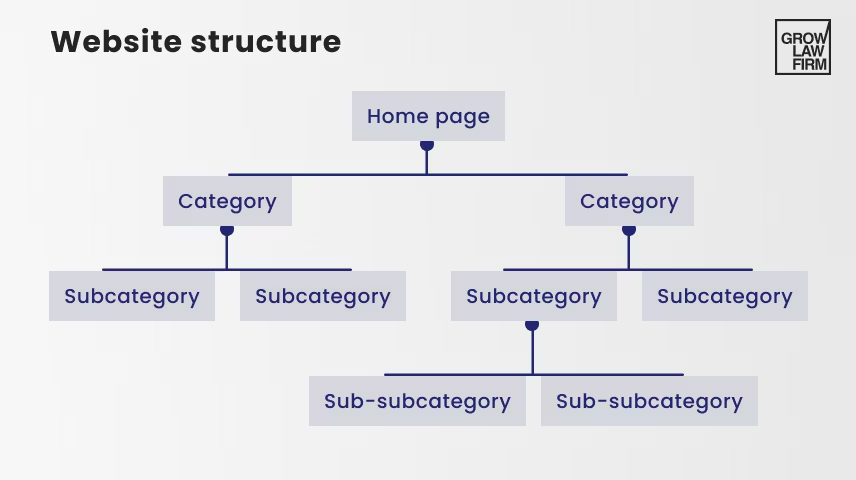
This structured approach distributes authority across the site, ensuring visibility for each practice area and attorney profile. It also strengthens topic relevance, enhancing your chances of ranking in local searches when clients look for specific legal services in your area.
Action Tips on How to Fix Website Structure
Here are some effective strategies to optimize your law firm's website structure for both users and search engines:
- Logical site navigation: Structure your content in a clear hierarchy (e.g., Home > Practice Areas > Specific Services) to improve user experience and help search engines crawl your site effectively.
- Optimized URL structure: Keep URLs concise and descriptive, incorporating primary keywords. For example, use /personal-injury/auto-accidents/ instead of lengthy, confusing strings.
- Strategic internal linking: Connect related pages to guide users and spread link equity. Focus on linking to key content like practice area pages and case studies.
- Comprehensive sitemaps: Use XML sitemaps to help search engines index your site efficiently. For larger sites, add HTML sitemaps to enhance navigation and ensure all pages are discoverable.
4. Site Speed Optimization
Site speed optimization involves minimizing page load times and maximizing responsiveness across your law firm's website. This technical factor has evolved from a minor consideration to a critical ranking and conversion element in recent years.
Slow sites kill conversions. If a potential client clicks on your article, "Applying for a Patent to Protect Your Legal Rights," and it loads too slowly, they'll just go back. Aim for LCP of 2.5 seconds or less, INP of 200 milliseconds or less, and CLS of 0.1 or less at the 75th percentile of page visits. Improving these metrics makes it easier for potential clients to read and use your page.
Google's Core Web Vitals framework has formalized the measurement of site performance through three key metrics that evaluate different aspects of user experience. These metrics assess load speed (Largest Contentful Paint), interactivity (First Input Delay), and visual stability (Cumulative Layout Shift) to provide a comprehensive picture of how users experience your web pages.
Action Tips on How to Optimize Site Speed
Speed up your site by:
- Evaluating web hosting, using fast hosting with appropriate server response times and adequate resources for your site's traffic patterns.
- Compressing images without sacrificing quality, particularly for attorney headshots and practice area visuals that convey professionalism.
- Enabling caching and CDN to deliver your content from servers geographically closer to your potential clients, reducing latency.
- Minimizing HTTP requests to consolidate files and eliminate unnecessary scripts and third-party widgets that slow down critical pages.
- Optimizing CSS and JavaScript to remove unused code and leverage modern delivery techniques like lazy loading for non-critical resources.
- Browser Caching to store commonly used files locally on visitors' devices, making return visits significantly faster.
- Optimizing images via TinyPNG to reduce file sizes without visible quality loss, particularly important for law firm websites that rely on professional imagery.
- Focusing on Core Web Vitals: Measure LCP, INP, and CLS using field data, and investigate problems with performance diagnostics.
Get a Complimentary Marketing Audit
Find out how much demand there is in your geographical area
Request Audit

5. Mobile-Friendliness
Mobile-friendliness refers to how well your law firm's website functions across various mobile devices. This isn't merely about fitting content onto smaller screens—it involves creating an optimized experience that maintains functionality, readability, and usability regardless of device. Because many legal searches happen on phones, mobile usability is fundamental rather than optional.
Google's mobile-first indexing means the search engine primarily uses the mobile version of your site for ranking and indexing. Firms that neglect mobile optimization make it harder for Google and users to evaluate the site positively, even if the desktop experience looks strong.
Action Tips on How to Fix Mobile-Friendliness
To make a mobile-friendly website for lawyers, you need to:
- Use PageSpeed Insights, Lighthouse, and Google Search Console’s Core Web Vitals report for performance diagnostics, then test navigation, tap targets, and forms on mobile devices.
- Use a responsive design that automatically adjusts the layout based on screen size rather than creating separate mobile versions.
- Fix tap targets and text readability by ensuring buttons are large enough for fingertips and font sizes remain legible without zooming.
6. Website Security
Website security involves the protective measures implemented to safeguard your law firm's website from unauthorized access, data breaches, and other cyber threats. For legal websites, security is particularly critical given the sensitive client information often exchanged through contact forms and secure portals.
Beyond client protection, HTTPS is a baseline trust signal and a lightweight ranking signal; for law firms, it is also essential for protecting form submissions and client communications.
Action Tips on How to Fix Website Security
To enhance website security:
- Use a valid TLS certificate and HTTPS to encrypt data in transit; encryption protects the connection but does not establish that a website is trustworthy.
- Adopt an HTTPS Protocol across your entire site, not just on contact or payment pages, as partial implementation can trigger security warnings.
- Backup your website regularly to ensure quick recovery from potential attacks without extended downtime that could harm rankings.
- Use a web application firewall (WAF) to filter malicious traffic before it reaches your site, preventing common exploit attempts.
- Keep software updated, especially your content management system and plugins, as outdated components are primary entry points for attackers.
- Set up malware scans to detect and remove potentially harmful code that could compromise your site's security and reputation in organic search results.
7. Technical SEO for Image and Video Content
Technical SEO for visual content involves optimizing the behind-the-scenes aspects of images and videos to improve both user experience and search visibility. These visual elements require specific technical optimizations to ensure they contribute positively to your overall SEO strategies rather than creating performance issues.
The technical implementation of visual content can affect page speed, accessibility, structured data opportunities, and user engagement. Proper image and video implementation also contributes significantly to content comprehension and accessibility, supporting both ADA compliance and improved user experience metrics that influence lawyer SEO performance.
Action Tips on How to Fix Visuals
- Use modern formats like WebP for images and WebM for videos to leverage advanced compression algorithms.
- Optimize file size through appropriate compression techniques that balance visual quality with performance.
- Set exact dimensions in HTML to prevent layout shifts during loading, which negatively impacts Core Web Vitals scores.
- Implement cloud storage and CDN delivery for larger visual assets.
- Add descriptive alt text and captions that accurately describe the content; include keywords only when they are genuinely relevant.
- Ensure proper video embedding with lazy loading techniques and responsive containers that adapt to screen sizes.

Level Up Your Brand
Find out how much demand there is in your geographical area
Book a Free Consultation
Don’t Let Technical SEO Hold Your Law Firm Back
Issues with your technical SEO could silently be sabotaging your firm's digital performance.
Improving visibility where potential clients search for legal help can support qualified leads and revenue when the site is also useful and conversion-ready.
Does the thought of tackling technical SEO feel overwhelming? Let us handle it. At Grow Law, our law firm SEO services include technical audits that identify priority issues and a team that can help resolve them.
Why risk your visibility and your revenue? Contact us for a complimentary technical SEO assessment today.
And now that you know the essentials of technical SEO:
Read Our Next Article → Stop Losing Leads: 12 Tips to Fix Your Law Firm’s Website Content Today
Struggling to turn website visitors into clients? Use these content improvements to improve lead quality and make your pages easier for prospects to act on.
Previous Chapter
On-Page SEO for Lawyers
Start Reading
Next Chapter
Content for Law Firm Website
Start Reading

Compare Your Practice Instantly
Stay Ahead of the Competition!
Compare your law firm's performance to Local competitors with our instant assessment tool
Get a clear picture of your firm's performance
Boost your online presence
Compare My Firm
Compare Your Practice Instantly
Stay Ahead of the Competition!
Compare your law firm's performance to Local competitors with our instant assessment tool
Get a clear picture of your firm's performance
Boost your online presence
Compare My Firm
