


Table of Contents
Call tracking for law firms is one of those tools that nearly every firm needs and almost no firm sets up correctly the first time. Done right, it tells you exactly which marketing channels are producing phone calls, which keywords are driving qualified leads, and how much revenue each campaign is actually generating. Done wrong — which is common — it quietly undermines your Google Maps rankings while you're trying to measure your SEO performance. This guide explains the difference, and how to get the setup right. Analytics for law firms combines this call attribution with web, form, CRM, and revenue data.
The core tension is simple: call tracking requires putting a different phone number on your website than the one Google expects to see. That creates a conflict with local SEO, where Google's ranking algorithm depends on your phone number being consistent across your website, Google Business Profile, and 40+ directory listings. Solve the conflict incorrectly, and you can lose Map Pack positions while thinking your marketing is working fine.
Understanding how call attribution fits into a full SEO investment → Law firm SEO
Why Call Tracking Matters for Law Firms (and Why Most Firms Get It Wrong)
A firm receiving 70 calls a month without call tracking knows one thing: 70 calls came in. It does not know whether those calls came from organic search, Google Business Profile, PPC campaigns, legal directories, or a referral source. That is not a minor data gap. It is the difference between knowing your SEO campaign is working and guessing.
The practical cost of that gap is real. Texas Horizons Law Group achieved a 510% marketing ROI — $5.10 in return for every marketing dollar spent. That figure is only calculable because calls were attributed by channel. When we could see that 77% of GBP-driven website clicks converted into calls, and that organic traffic was producing specific lead volume, we could optimize the channels that were working and stop wasting budget on the ones that weren't. Without attribution, you cannot make those decisions. You are managing a marketing budget by instinct.
The most common error firms make when they first set up call tracking is replacing their main phone number on their website — and sometimes on their Google Business Profile — with a tracking number. That tracking number is now on the website and GBP but not yet synced to the 40+ directories where the firm is listed. You now have a three-way NAP inconsistency, and Google is less confident about where to rank your firm. Rankings drop. Calls drop. And the firm often attributes the drop to something else because the call tracking setup looked correct.
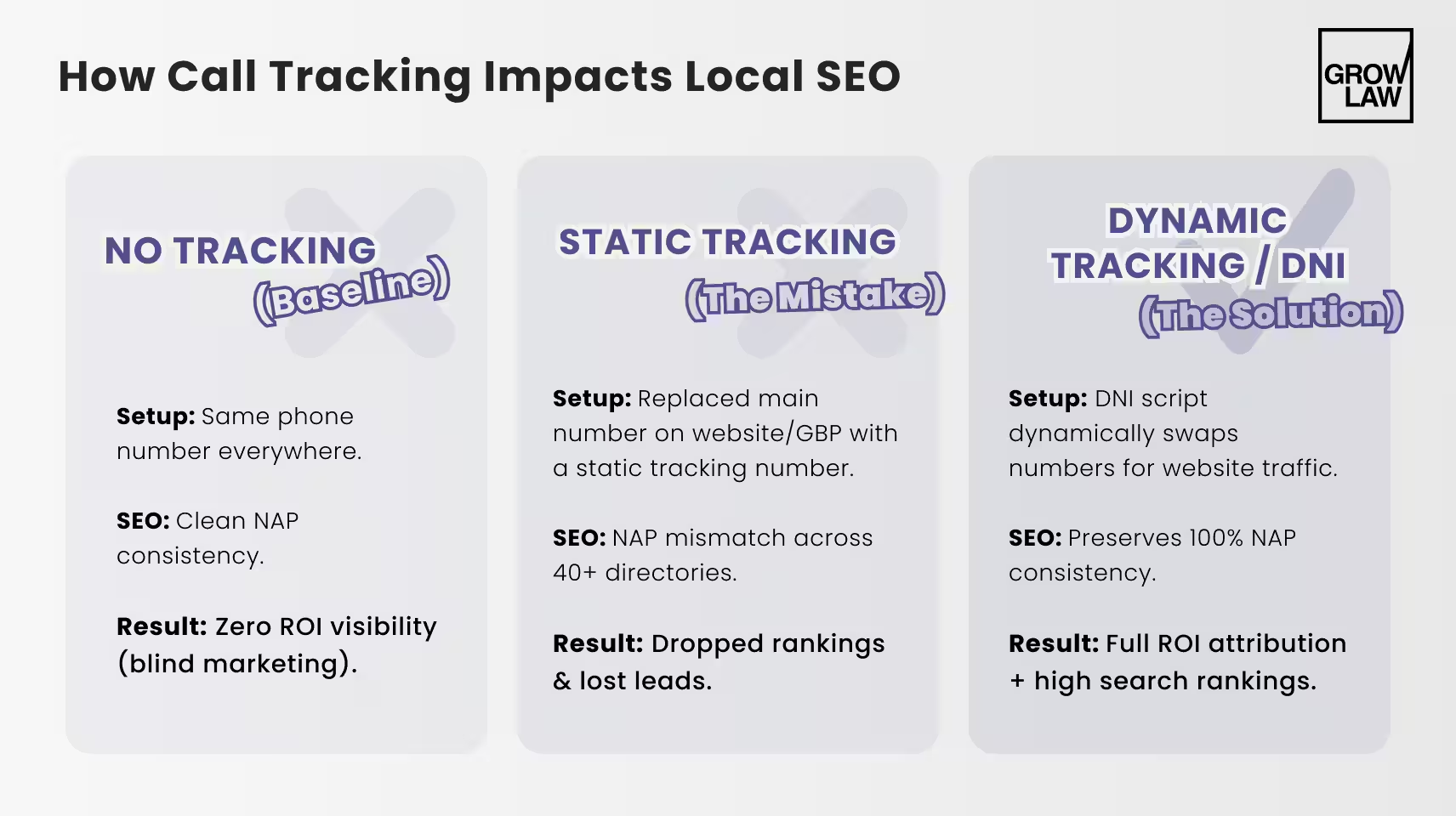
How Call Tracking Works: Static Numbers vs. Dynamic Number Insertion
There are two fundamentally different ways to implement call tracking. Understanding the difference is what determines whether your call tracking helps or hurts your local SEO.
The first approach is static tracking numbers. A unique phone number is assigned to each marketing channel — one number for your PPC campaigns, one for your organic website traffic, one for a specific directory. These numbers are shown permanently wherever you place them. When someone calls the PPC number, you know the call came from paid advertising. Simple to set up, reliable to report.
The problem: if you place a static tracking number in your website's HTML as your firm's primary phone number, Google reads that tracking number as your NAP phone number. If it doesn't match the number on GBP and your directories, you have a NAP inconsistency. This is the mistake that most firms make when they first implement call tracking. The call tracking software works correctly — it tracks calls. But the local SEO damage runs silently in the background.
The second approach is dynamic number insertion (DNI). DNI uses a small JavaScript snippet that swaps the real phone number displayed on your website for a tracking number — but only in the browser, for the visitor. The underlying HTML of your page still contains your real NAP phone number. Google's crawlers read the HTML. They see the real number. The visitor's browser displays the tracking number. The visitor calls the tracking number, which logs the call in your tracking system. No NAP inconsistency. No ranking damage.
| Setup type | How it works | NAP risk | Best use case |
|---|---|---|---|
| Static tracking number | Unique number per channel, shown permanently | High if placed in main website HTML or GBP | PPC landing pages, call-only ads — channels where local SEO is not a factor |
| Dynamic number insertion (DNI) | JS swaps real number for tracking number in browser only; HTML retains real number | None — Google reads the real number in HTML | Main website — organic, GBP, and any channel where NAP consistency matters |
| Hybrid (recommended) | DNI on website; static numbers for paid landing pages only | None if implemented correctly | Firms running both SEO and PPC simultaneously |
Does Call Tracking Hurt Local SEO? The NAP Consistency Problem
Call tracking does not hurt local SEO when set up correctly. It absolutely hurts local SEO when set up incorrectly. The distinction matters because we see both outcomes regularly.
NAP consistency — your firm's Name, Address, and Phone number appearing identically across your website, Google Business Profile, and all directory listings — is one of the signals Google uses to verify that your firm is what it claims to be and show it in local results. When a static tracking number replaces your real phone number on your website or GBP, it introduces a discrepancy between what those platforms show and what your directories show. Google sees inconsistency and becomes less confident about ranking your firm prominently.
Here is what that looks like in practice. A criminal defense firm we worked with set up call tracking by replacing their primary phone number on their website and GBP with a tracking number. Within 45 days, their Map Pack ranking dropped from position two to position six for their main city keyword. The problem: the tracking number was on the website and GBP, but their 40+ directory listings still showed the original number. Three different phone numbers across three groups of platforms. Google's local algorithm treats that kind of inconsistency as a negative signal. After switching to DNI on the website, reverting the GBP number to the original, and leaving the directories unchanged, rankings recovered within five weeks.
A single phone number inconsistency across your website and GBP is enough to push a firm from position two to position six on Google Maps. The fix is DNI — not avoiding call tracking entirely.
The fix is not to avoid call tracking. It is to use DNI for any number that appears in your main website HTML or on your Google Business Profile. Static tracking numbers belong only on dedicated PPC landing pages that are not indexed and not part of your local citation footprint.
How Grow Law handles call attribution as part of SEO management → Attorney SEO services
The Right Call Tracking Setup for Law Firms: Step by Step
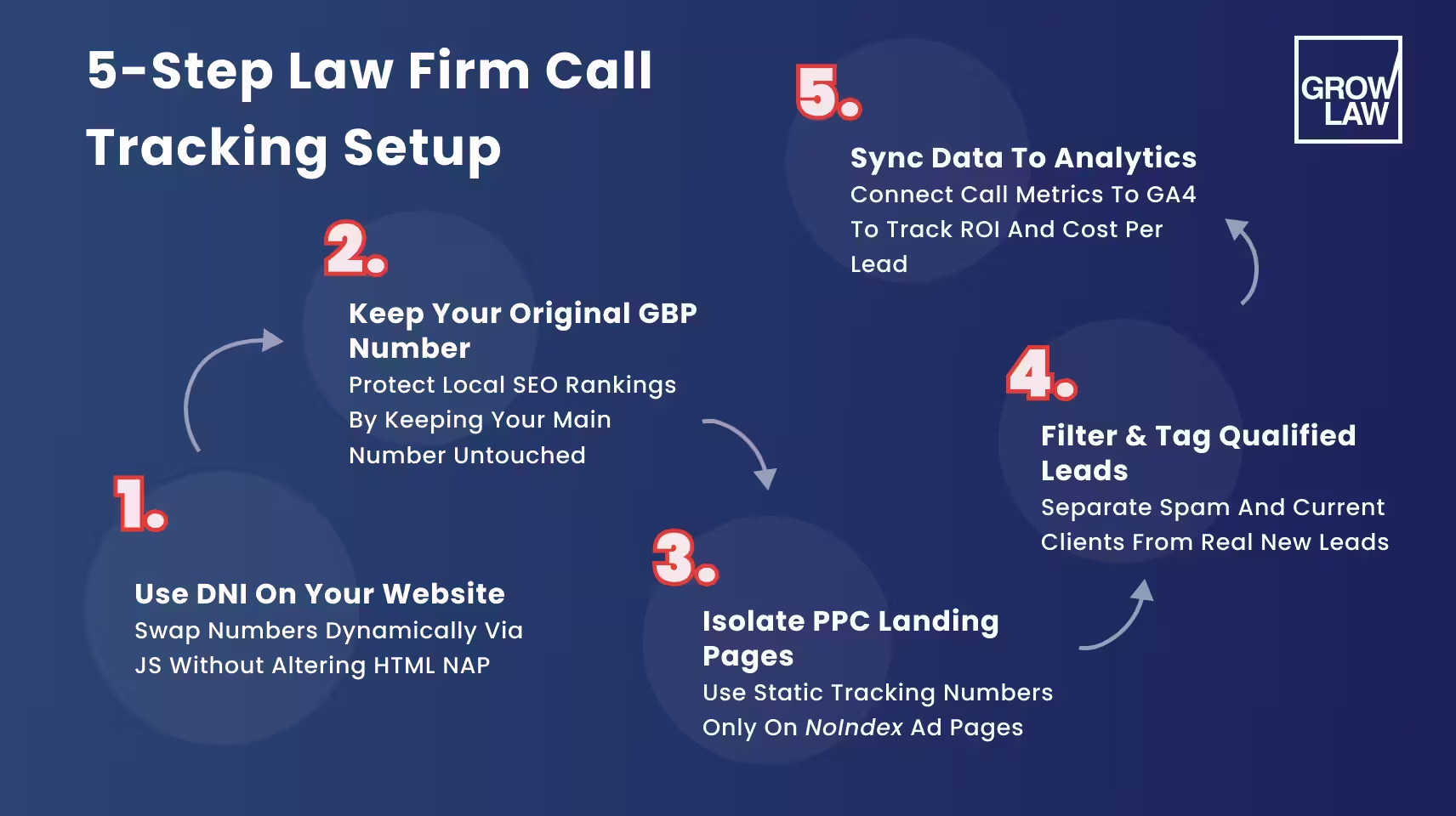
Here is the configuration we recommend for firms running both SEO and PPC campaigns. Every step matters — skipping any of them reintroduces the NAP inconsistency risk.
- Use DNI on your main website. The real NAP phone number must remain in the HTML. Your call tracking platform (CallRail, CallTrackingMetrics, WhatConverts) installs a JS snippet that handles the swap for visitors.
- Keep your original number on Google Business Profile. Never replace the GBP phone number with a tracking number. GBP is one of the most watched fields in Google's local ranking algorithm.
- Use static tracking numbers only for PPC landing pages. These pages are not indexed (use noindex), so they do not affect your citation footprint. A unique tracking number per campaign on a dedicated landing page is safe and effective.
- Set up call recording and qualification tagging. Raw call volume is a misleading metric — it includes spam, wrong numbers, and existing client calls. Tag each call as qualified, unqualified, or existing client, and report only on qualified new leads.
- Connect call data to your analytics and reporting platform. If call data lives in your call tracking software but not in your Google Analytics 4 or marketing dashboard, you cannot see the full attribution picture. Grow Law's Growth Portal pulls this together so clients see qualified leads, cost per lead, and ROI in one place in real time.
The first qualified leads from a correctly set up SEO campaign typically appear in the 90–120 day window. That is exactly when proper call attribution matters most — because until you can see which channel is producing the calls and whether those calls are converting to signed cases, you cannot optimize your budget with any confidence.
SEO Attribution: How to Know Which Calls Came from Organic Search
Attribution tells you not just that a call happened, but where the caller came from before they called. For law firms, the most important attribution questions are: Did this call come from organic search or paid advertising? If organic, what keyword did the caller use? Did the caller visit the website multiple times before calling, and which channels did they use each time?
The three attribution models you need to understand: Last-touch attribution assigns all credit to the final channel the caller used before calling — if they found you through organic search and called from the website, organic search gets credit. Multi-touch attribution distributes credit across every channel the caller encountered — useful when a caller first found you through a legal directory, revisited via GBP, and then called through the website. Assisted conversion tracking captures cases where organic search contributed to the decision even if the final call came from GBP or a directory.
In Google Analytics 4, organic-to-call attribution requires that your call tracking events fire as conversions, that you have session-source data connected to those conversion events, and that you have set up proper UTM parameters on any paid campaigns so they don't get miscounted as organic. This setup is not complicated, but it requires doing it correctly the first time — fixing it retroactively means losing historical data.
Here is what misattribution costs when you get this wrong. A personal injury firm was running SEO and PPC simultaneously without call tracking. Every month they received 60–80 calls but could not attribute them by channel. After 18 months they decided to cut PPC spending because organic traffic appeared to be working. Calls dropped 40% the following month. It turned out that 55% of their calls had been coming from PPC, not organic. After implementing proper call tracking with source attribution — separate static tracking numbers for PPC landing pages, DNI on the main website — they restored the correct budget split and recovered call volume within six weeks. Eighteen months of budget decisions had been made based on incomplete information.
Common Call Tracking Mistakes Law Firms Make
After setting up call tracking for a large number of law firms, we see the same handful of errors consistently. All of them are preventable.
| Mistake | Consequence | Fix |
|---|---|---|
| Replacing GBP phone number with a tracking number | NAP mismatch with directories — Map Pack rankings drop | Keep the real number on GBP. Use DNI on the website instead. |
| Placing a static tracking number in main website HTML | Google reads the tracker as your NAP number — inconsistency with directories | Use DNI so the real number stays in HTML; tracker only displays in browser |
| Tracking raw call volume instead of qualified leads | Inflated metrics — spam and wrong numbers look like campaign wins | Tag every call: qualified / unqualified / existing client. Report on qualified only. |
| No call recording or tagging | Cannot verify call quality or filter intake calls from noise | Enable call recording in your tracking platform. Build a tagging workflow. |
| Call data not connected to ranking reports | Cannot correlate ranking improvements to actual lead volume changes | Connect call tracking to your analytics dashboard. Track calls as GA4 conversion events. |
| One tracking number for all organic channels | Cannot distinguish calls from GBP vs. website vs. directories | Separate tracking numbers per source: one for website (via DNI), one for each paid channel |
The reason these mistakes persist is usually that call tracking setup was done once, quickly, by someone who understood the call tracking side but not the local SEO implications. The two disciplines need to be coordinated at setup. Fixing it retroactively — especially if rankings have already dropped — takes longer than getting it right the first time.
Summary
- Call tracking for law firms is essential for ROI measurement, but static tracking numbers placed in your website HTML or on GBP will hurt your local SEO rankings.
- Use dynamic number insertion (DNI) on your main website. The real NAP number stays in HTML — which is what Google reads. Visitors see a tracking number.
- Keep your real number on Google Business Profile. Never swap it for a tracking number.
- Use static tracking numbers only on PPC landing pages that are noindexed and outside your citation footprint.
- Tag every call as qualified, unqualified, or existing client. Report on qualified leads, not raw call volume.
- Connect call data to your analytics platform from the start. Fixing attribution retroactively means losing historical data.
See how Grow Law handles attribution as part of a complete SEO campaign → SEO for law firms
FAQ
-
Does call tracking hurt local SEO?
Does call tracking hurt local SEO only when set up incorrectly? Placing a static tracking number in your website HTML or on Google Business Profile creates a NAP inconsistency with your directory listings, which reduces Google's confidence in your local rankings. Properly implemented call tracking — using dynamic number insertion on the website and keeping the real number on GBP — does not affect local SEO at all and gives you full attribution data.
-
Can law firms use dynamic number insertion for SEO?
Can law firms use dynamic number insertion for SEO — yes, and it is the recommended approach. DNI keeps your real phone number in the HTML of your website, which is what Google crawls for NAP consistency. The tracking number is only shown to visitors in their browser via JavaScript. Google never sees the tracking number. Local rankings are unaffected. Calls are tracked. This is the correct way to run call tracking alongside an active local SEO campaign.
-
How to track calls without hurting NAP consistency?
How to track calls without hurting NAP consistency: use DNI on your main website, keep the original number on Google Business Profile, and use static tracking numbers only on PPC-dedicated landing pages that are noindexed. Your directories should always show the same number as GBP. Audit your NAP footprint every time a tracking setup changes to confirm nothing has drifted out of sync.
-
What is the best call tracking setup for law firms?
What is the best call tracking setup for law firms combines DNI on the main website, the real NAP number on GBP, static tracking numbers on PPC landing pages only, call recording with qualification tagging, and integration with Google Analytics 4 for full attribution. This configuration gives you accurate lead attribution by channel without introducing NAP inconsistency that can damage local search rankings.
-
How to attribute phone leads from SEO?
How to attribute phone leads from SEO requires DNI on your website firing a call tracking event when a visitor calls, that event passing session-source data to Google Analytics 4, and proper UTM parameters on all paid campaigns so they are not miscounted as organic. With this setup, you can see which organic keywords and pages are producing calls, how many calls convert to signed cases, and what your true organic SEO ROI is.

Compare Your Practice Instantly
Stay Ahead of the Competition!
Compare your law firm's performance to Local competitors with our instant assessment tool
Get a clear picture of your firm's performance
Boost your online presence
Compare My Firm
Compare Your Practice Instantly
Stay Ahead of the Competition!
Compare your law firm's performance to Local competitors with our instant assessment tool
Get a clear picture of your firm's performance
Boost your online presence
Compare My Firm
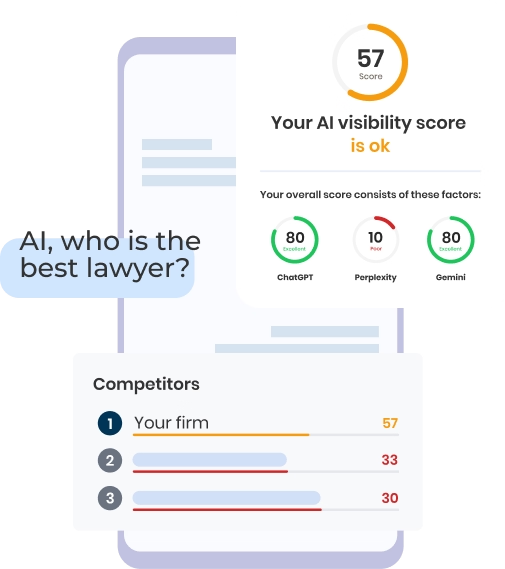
Check Your AI Visibility Instantly
Find Out What AI Is Telling Your Potential Clients
Run our free AI Visibility Report to:
See how often top AI tools mention your law firm
Spot which competitors show up first
Get the next steps to capture more cases
Run My Free AI Report
.avif)
.avif)
.avif)

